Once again, I was working on my new blog theme again and ran into the need to set the opacity of a background div without affecting the children. The support for opacity is spotty and slightly unpredictable. The other downside is that setting opacity via CSS affects the children of the transparent object. You can get around this by using an rgba background colors and specifying the alpha channel.
background-color: rgba(24, 117, 187, .5)
This specifies a background color of red: 24, blue: 117, green: 187 and an alpha of 50% transparency. I put up an example of this on jsFiddle here: http://jsfiddle.net/tobint/gazuB/
Here’s a side-by-side example of the differences between opacity and rgba.
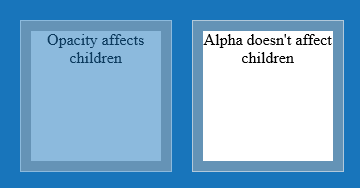
The div on the left has set an opacity of .5 on the div container. On the div on the right, I’ve set the background color with an alpha of .5 using rgba. Notice that the sample on the left has affected the transparency of the child div, but the sample on the right has not.
You can also set colors using hsla (hue, saturation, and lightness).
background-color: hsla(206, 77%, 41%, .5)
Of course, this only works in browsers released in the last few years:
- Safari 3.1 in March 2008
- Firefox 3 in June 2008
- Chrome 4.0 in January 2010
- Internet Explorer 9 in June 2011